
To make AI videos for YouTube that grow a channel, make a show. One series and one cast, full episodes finished before launch, a trailer and Shorts that point back to them, and one set day a week. Agent Social makes each episode and hands you the MP4; you upload it to YouTube yourself.
How do you make AI videos for YouTube?
You make AI videos for YouTube by running the channel like a network runs a show, which comes down to five things a random-clip channel skips. Pick one series, so every video leads to the next. Finish several episodes before the channel goes live, so launch week has something to binge. Give each episode a title that names its conflict. Upload in 1080p, drafted at 480p and upscaled once the film is final. And do the upload yourself: the studio hands you an MP4, and you put it up in YouTube Studio yourself, with your own title and playlist. How an episode gets made, from the brief to the last clip, is in the step-by-step guide to an AI TV series, and the AI TV series maker shows the studio side. OVERCLOCK is the worked example: Episode 3 runs 5 minutes 42 seconds from 14 clips, and a five-minute episode like it can be done in two to three hours.
15–40 s
one whole moment per Short, cut from the episode
29 s
the Episode 3 trailer: three moments and an end card
1
set day a week for new episodes
1080p
every upload, upscaled once from 480p drafts
Should an AI YouTube channel be one series or random videos?
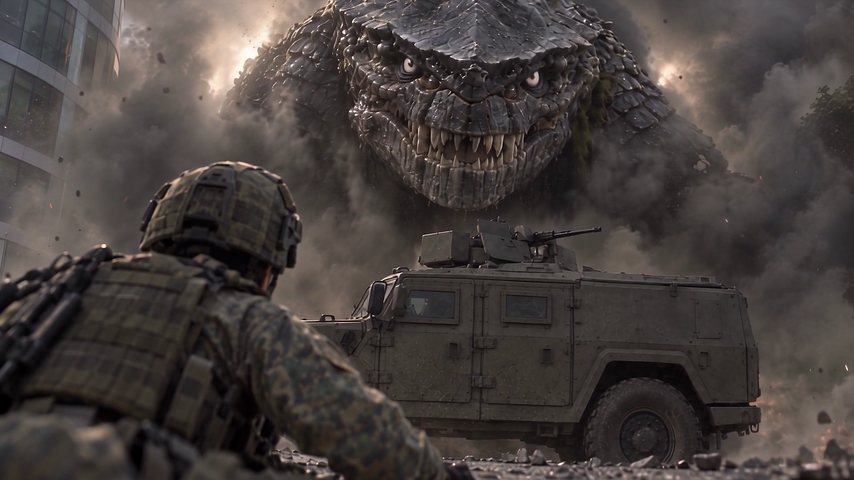
One series, almost always. A channel of unrelated clips gives a viewer nothing to come back for, while a series hands them a question: what happens next? Recurring characters turn one view into a habit, and every new episode sends people back to the first. The rules point the same way: YouTube doesn’t pay for AI videos that look mass-produced or templated, as of November 2026; what YouTube pays for and what it refuses has the full rules. A series is also the honest version of a faceless channel: you never appear, because your characters are the faces. Need a show? Start from these AI YouTube channel ideas, each with a line to type. OVERCLOCK works this way: one lead, Deep, and one creature that walks out of the sea in Episode 3 and is still in Singapore in Episode 5.
Random AI clips
- A new idea every upload
- Nobody to come back for
- Easy to mistake for mass-produced content
- Each video has to find its audience alone
One series
- One show, one cast, every episode
- Viewers subscribe to see what happens next
- An original story that is clearly yours
- The trailer and every Short point to an episode
Should you post full episodes or Shorts on an AI channel?
Post both, because they do different jobs: the full episode is what people watch and subscribe for, and Shorts are the door that leads to it. Make the episode first, at whatever length the story needs; OVERCLOCK’s Episodes 3 to 5 run from under five minutes to just over ten. Then cut each Short from the finished 1080p film: one whole moment of 15 to 40 seconds, in the order it happens, with the film’s own sound and a title that names the conflict, and set its related video to the full episode. A Short that ends on a question, with the answer one tap away, is the best trailer an episode can have. Turning your film into Shorts and posts covers the tall copies and the posts, and long-form AI video shows what a full episode can hold.
What shape and quality should AI videos for YouTube be?
Make full episodes wide, like a TV show, upload them in 1080p, and draft everything at 480p first. In Agent Social, a series is either wide or tall, and every episode keeps that shape: a wide film stays wide and a tall one stays tall, so choose tall only if the whole show is made for phones. Film every clip and every retake at 480p, which is plenty to judge faces, timing and sound, then upscale the finished film to 1080p before you upload it. Video is $25 a finished minute at 480p, or $45 drafted at 480p and upscaled to 1080p in one click; retakes, writing and pictures use some credits on top (what an AI episode costs). It is pay as you go, with no subscription, and unused credits never expire. OVERCLOCK Episodes 3 and 4 were filmed at 480p and upscaled once, at the end. Slide the calculator to your own season.
What a season costs: slide to your episode length and count
- Drafted and finished at 480p$25/minute
- $1,200
- Then upscaled to 1080p in one click+$20/minute
- +$960
- Finished film in 1080p, in all$45/minute
- $2,160
48 finished minutes at the published prices. Retakes add to it, and there is no subscription: you pay for what you make.
How should you title AI videos on YouTube?
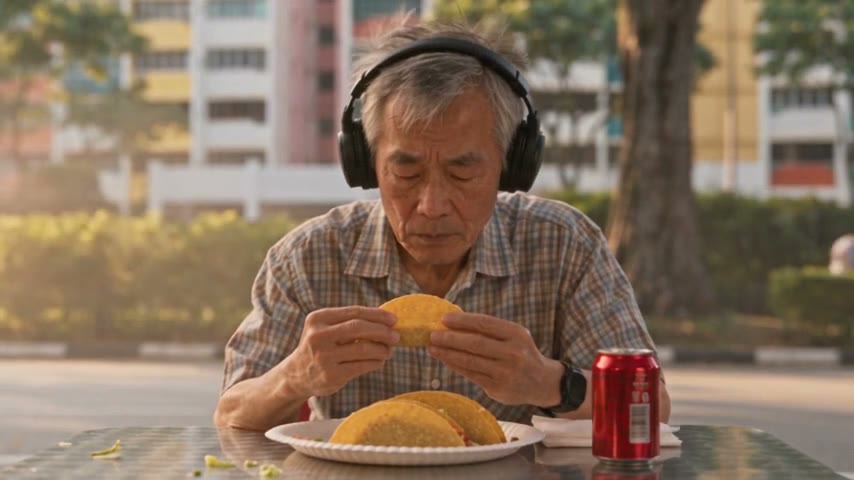
Name the conflict, not the episode number. Someone scrolling decides in a second, and a title that sets two things against each other hands them a question they want answered. OVERCLOCK’s episodes are called things like “Kaiju Walking Down the Street vs Grandpa Eating Tacos” for Episode 4 and “Why Did It Walk Straight to That One Building?” for Episode 5, and the Episode 3 trailer is “His Mom Said Dinosaurs Aren’t Real. Then One Walked Out of the Sea”. Keep the series name and episode number in the description and in a playlist that runs in order, like the channel’s OVERCLOCK Season 1. YouTube’s own English subtitles are on every episode. In Agent Social, the studio writes a YouTube title, description and tags for the finished film, and you change any of them by asking. See how Episode 4 was made, grandpa and tacos included.
What should the thumbnail of an AI series episode show?
One face and the trouble, in the same frame. A thumbnail is the title’s picture: if the title sets two things against each other, the thumbnail shows both, so a stranger gets it at phone size in a second. Take it from your own film rather than painting something new, so the episode delivers exactly what the picture promised; a frame from the 1080p upscale stays sharp when YouTube shrinks it. Pick a moment with a clear face, a clear threat, and room for two or three words at most. Episode 4’s title practically draws its own thumbnail: an old man at his table, the creature on the road behind him. Do the same for the trailer and every Short. As of November 2026, YouTube also asks for the “AI use” answer in Studio on realistic AI footage, and whether AI videos can earn on YouTube covers that rule and the label viewers see.
How do you start an AI YouTube channel?
Start with finished episodes in hand, because an empty channel and a promise give nobody a reason to subscribe, and a few episodes in reserve mean a busy week never breaks your schedule. Give the channel a short name that will still fit your second show; how to name an AI channel has six patterns and fourteen invented names to start from. Launch with a trailer cut from the finished film and Episode 1 beside it, set a channel trailer, and pick one day a week for new episodes. Between episodes, Shorts keep people coming back. The guide to cutting a trailer shows how OVERCLOCK’s was made. Agent Social is also a social media AI agent: it can write your posts and publish them straight to X, and nothing goes out without your approval. The plan below is the whole launch, week by week.
Write the show once
Before launchDescribe the series in a short brief: who it follows, the look, wide or tall. Then make the cast once and check every face before anything is filmed.
Finish the first episodes
Before launchFilm them in story order at 480p, watch each clip as it arrives, then upscale each finished episode to 1080p. A few episodes in hand means a busy week never costs you your day.
Cut the trailer
Launch weekPick a few whole moments from Episode 1, keep them in film order, and end on a card that says where to watch. The trailer for OVERCLOCK Episode 3 is 29 seconds: three moments and an end card.
Go live
Launch dayUpload the trailer and Episode 1, answer the “AI use” question in Attributes, start a Season 1 playlist in order, and set a channel trailer. OVERCLOCK’s channel trailer is the full Episode 3.
Keep the day
Every weekOne new episode on the day you picked, with Shorts in between that each point to the full episode. An AI agent for social media can write and publish the posts that go with them on X.
Is your channel ready to launch?
- Can you say what your series is about in one sentence, with a character in it?
- Are your first few episodes already finished?
- Does every episode use the same main cast?
- Will each episode go up in 1080p?
- Do you plan to fill the gaps with clips unrelated to the series?
Answer each question for your verdict.