
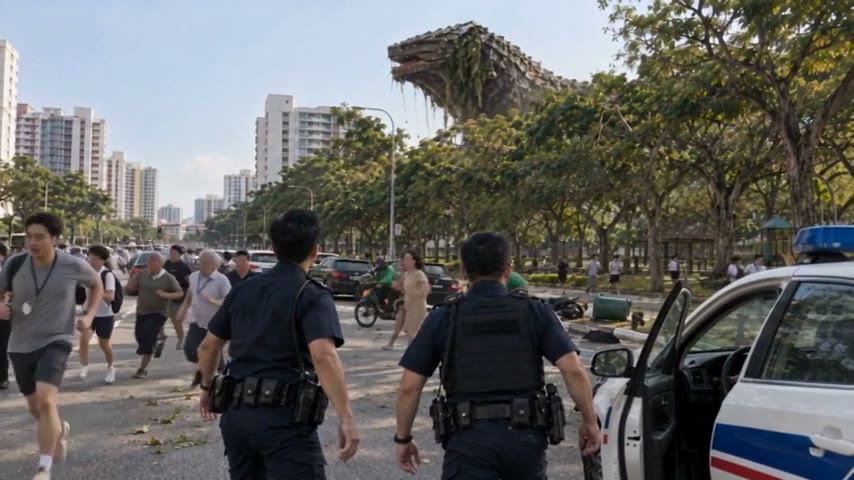
To make an AI movie trailer, make the film first, then cut the trailer from the finished film: a few whole moments in the order they happen, one line of words on screen, and an end card that says where to watch. That is exactly how I cut the 29-second trailer for OVERCLOCK Episode 3.
What makes a good movie trailer?
A good trailer sells the film without giving it away. It shows who the story is about, what goes wrong and how the film feels, then stops on a question only the full film answers. That holds whether the film was shot on a camera or made with AI. The usual mistake with AI films is a reel of the best-looking shots, as if the effects were the reason to watch. People watch for what happens to someone. The trailer for OVERCLOCK Episode 3 never explains its creature. It starts with a boy who sees it first and a mother who does not believe him, lets the creature arrive, then shows a city finding out. You know who, what and where, and you still want the rest: one click from the film, with a reason to make it.
A trailer is a promise. Cut it in the order the film keeps it.
Should you make the film before the trailer?
Yes. Make the film first and cut the trailer from the finished film, so every moment in the trailer is a promise the film already keeps. A trailer made before the film is a guess: the scene it teases may change, the line may be cut, and viewers notice when the film they get is not the one they were sold. Cutting from the finished film also means nothing new has to be filmed, and the faces, voices and sound already match. In Agent Social, finish the episode first: film every clip in order, join them, add the music, then upscale the finished film to 1080p in one click and download it as an MP4. That file is what you cut from. A five-minute episode can be done in two to three hours (how long an AI movie takes), and how Episode 3 was made shows the finished film its trailer was cut from.
Which moments should go in an AI movie trailer?
Pick three or four whole moments that read at once, even to a stranger: a line of dialogue, a reveal, a big wide shot. Include at least one spoken line, ideally with a small joke or a turn in it, so the characters feel like people, not effects. Then add the moment that shows how big the trouble is, and stop before the ending. A moment is whole when it plays from its own start to its own end: the question and its answer, the last step and the roar. The Episode 3 trailer uses three: a joke on a beach, the creature arriving, and a city finding out. Each one raises the stakes of the last, and none of them tells you how the episode ends. Here it is, beat by beat.
29 s
long, wide, cut from the film
3
whole moments, in the order they happen
1080p
cut from the upscaled finished film
1
line of words on screen, then the end card
The joke
Moment 1On a beach at sunrise, a boy says, “Mom, look! Dinosaur!” His mother answers, “Baby, dinosaurs aren’t real.” The exchange plays whole, as it does in the film.
The arrival
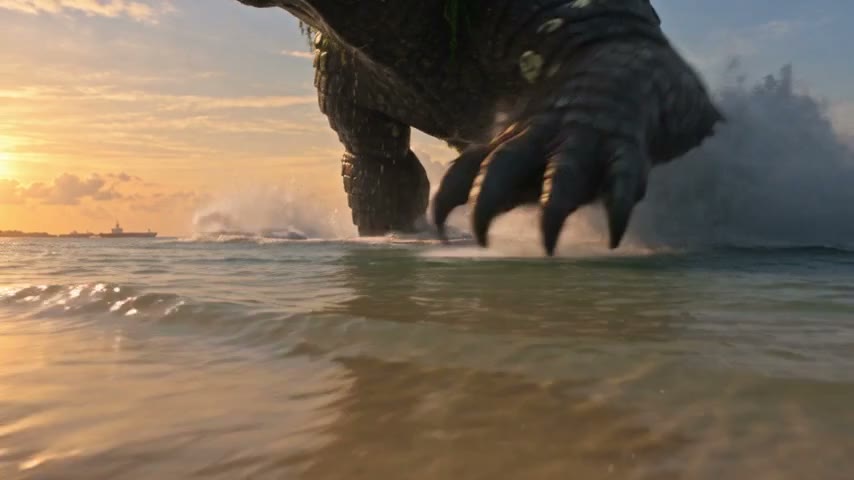
Moment 2The creature takes its last steps out of the sea and roars. One line appears on screen: “IT WALKED OUT OF THE SEA.”
The city
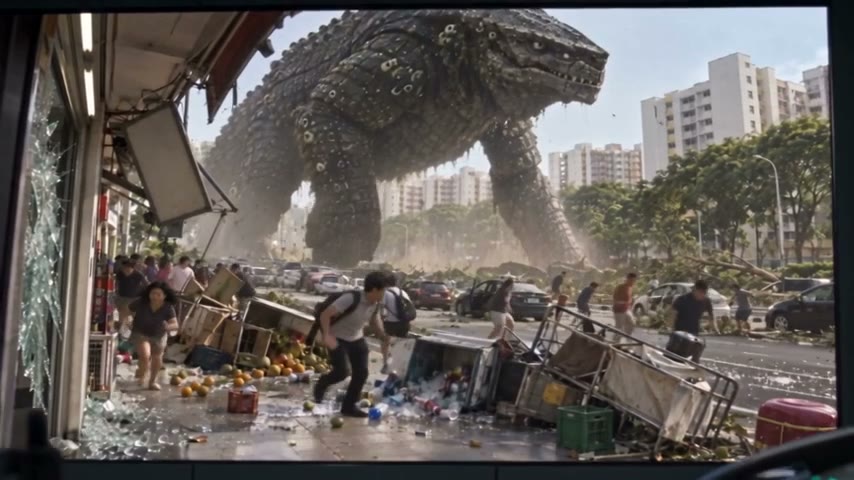
Moment 3It bursts out of the trees, crushes a car, a police officer radios it in, and it walks on.
Where to watch
End cardA black card reads “OVERCLOCK / EPISODE 3 · BURROWER / WATCH THE FULL EPISODE” over the closing music, and the full Episode 3 is one click away.
Why should a trailer keep its moments in story order?
Because a viewer builds the story as they watch, and a trailer in story order lets them do it in half a minute. Each moment sets up the next: the joke makes the arrival land, and the arrival makes the city frightening. Shuffle them and the set-ups stop working. The common AI trailer opens on the loudest shot, then flashes through fragments a second or two long, sometimes rewinding to the start. Every shot in it may be good, yet it feels strange, because nothing follows from anything. My rule for the OVERCLOCK trailer is a choice, not an industry law: events stay in film order. No flash-forward, no rewind, no chopped-up fragments, no roar-first opening. The trailer becomes a very short film of its own, with a set-up, a turn and a cliffhanger, the same shape as a good AI story video, and the full episode is the rest of it.
Roar-first fragments
- Opens on the loudest shot
- Flashes through pieces a second or two long
- Jumps forward, then rewinds
- Shows effects, not people
- Leaves a viewer impressed but not curious
Whole moments in film order
- Opens on a person and a line
- Plays each moment from its start to its end
- Keeps events in the order they happen
- Builds to the trouble, then stops
- Ends on where to watch the film
How long should an AI movie trailer be, and should it be wide or tall?
Long enough for every moment to play whole, and not a second longer. Three whole moments and an end card fit in 29 seconds, so each moment averages under ten: that is the Episode 3 trailer, about a twelfth of an episode that runs 5 minutes 42 seconds. So plan in moments and let the seconds follow. A fourth moment earns its place only if it raises the stakes again, and if a moment has to be chopped to fit, drop the whole moment, never half of it. Keep the trailer in the film’s own shape too, because a trailer also promises how the film will look: a wide film gets a wide trailer, which is how OVERCLOCK’s goes out on YouTube, wide and in 1080p. For Shorts and Reels, don’t squeeze the trailer into a tall frame; cut a Short instead, which turning your AI film into Shorts and posts covers.
How do you add on-screen words, music and an end card to a trailer?
Use one line of words on screen, your film’s own music, and an end card that says exactly where to watch. Put the line where nobody is speaking, so viewers never have to read and listen at once. The Episode 3 trailer lets the beach exchange play with no words at all, then sets one line over the creature’s arrival, “IT WALKED OUT OF THE SEA.”, and lets the pictures do the rest; words on every shot turn a trailer into an advert. For music, use your film’s own score, never someone else’s song. In Agent Social, you ask for music once the clips are joined, and every piece is composed as an original, so the trailer carries the same dialogue, roar and score as the film. End on a plain card with the show’s name, the episode and “watch the full episode”, and hold it as long as it takes to read it aloud twice. OVERCLOCK’s card is black, over the closing music.
How do you post a trailer on YouTube so people watch the film?
Upload it as its own video, give it a title that names the conflict, and point its end screen at the full episode. The Episode 3 trailer is titled “His Mom Said Dinosaurs Aren’t Real. Then One Walked Out of the Sea”, which gives a stranger the joke and the threat in one line, and its end screen points to the full episode. Episode 4 follows the same rule: “Kaiju Walking Down the Street vs Grandpa Eating Tacos”. Put the episode up first, so the trailer has somewhere to send people, and upload the MP4 to YouTube yourself. If your trailer looks real, YouTube’s help page on disclosing GenAI content, as of November 2026, asks you to answer Yes under “AI use” in the Attributes section, and says disclosing alone won’t limit a video’s audience. Rules change, so check that page. Making AI videos for YouTube covers the rest of a launch.
Is your trailer ready to post?
- Is every moment in the same order it happens in the film?
- Does each moment play whole, from its start to its end?
- Does at least one character speak a line?
- Could a viewer guess how the film ends from the trailer?
- Does it end on a card that says where to watch the full film?
Answer each question for your verdict.
Can Agent Social make a movie trailer for you?
Yes, in two ways, and neither is a one-click trailer button, because there isn’t one. The first is what I do: let Agent Social, the AI movie maker behind OVERCLOCK, make the film, then cut the trailer yourself from the 1080p download in any editor you like. The second, once the episode is finished, is to ask the studio for a trailer as a short film of its own in your AI TV series, so it uses the same cast and places as your episodes. It writes the trailer as chapters, you read and change them in plain words, and it films them in order with dialogue and sound, like any film. Either way the faces match the episode’s, because the cast was made once. Video is $25 a finished minute at 480p, or $45 drafted at 480p and upscaled to 1080p in one click; retakes, writing and pictures use some credits on top (what an AI episode costs).